Modifying
Removing Data
Not all the data contained in a GPX file is always relevant. With GPX objects, it is possible to remove unused data such as metadata, elevation and time data, as well as all data contained in extensions. This is particularily useful when using devices with limited storage space or computing power. A GPX file of a 10 km run downloaded from Strava weighing 345.4 kB can be reduced to a 52.5 kB file (ie: only 15.2 % of the original file size).
from ezgpx import GPX

# Parse GPX file
gpx = GPX("file.gpx")

# Remove metadata
gpx.remove_metadata()

# Remove elevation data
gpx.remove_elevation()

# Remove time data
gpx.remove_time()

# Remove extensions data
gpx.remove_extensions()

# Write new simplified GPX file
gpx.to_gpx("new_file.gpx")
Simplifying Track
It is sometimes usefull to reduce the amount of track points contained in a GPX file especially when dealing with low power or low capacity devices. The simplify() method reduces the number of points while maintaining good precision.
import ezgpx

# Parse GPX file
gpx = ezgpx.GPX("file.gpx")

# Simplify (using Ramer-Douglas-Peucker algorithm)
gpx.simplify()

# Write new simplified GPX file
gpx.to_gpx("new_file.gpx")
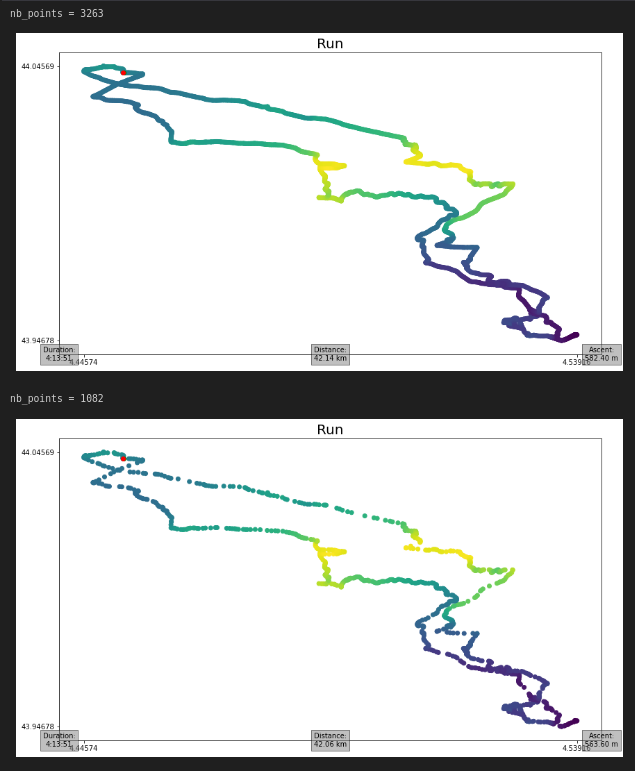
In the following example, a 42 km run downloaded from Strava went from 3263 track points to only 1082. This correspond to a 69% decrease in points and allows to save 704.6 kB (ie: 85.4 % of the original file size) by reducing the file size from 824.8 kB to 120.2 kB. It is clear that the algorithm used only removes points that do not provide significant information preserving the shape of the track.
from ezgpx import GPX

# Load and parse GPX file
gpx = GPX("file.gpx")

# Print number of track points
print(f"nb_points = {gpx.nb_points()}")

# Plot tracks
gpx.matplotlib_plot(start_stop_colors=("green", "red"), waypoints_color="blue", elevation_color=True, title="Run", duration=(0,0), distance=(0.5,0), ascent=(1,0))

# Simplify tracks
gpx.simplify()

# Print new number of track points
print(f"nb_points = {gpx.nb_points()}")

# Plot tracks
gpx.matplotlib_plot(start_stop_colors=("green", "red"), waypoints_color="blue", elevation_color=True, title="Run", duration=(0,0), distance=(0.5,0), ascent=(1,0))

# Save GPX
gpx.to_gpx("file_simplified.gpx")
Removing Errors
GPS devices sometimes lose signal generating errors in GPX files. The most noticeable errors (single isolated points) can be found and removed as follow.
import ezgpx

# Parse GPX file
gpx = ezgpx.GPX("file.gpx")

# Remove GPS errors
gpx.remove_gps_errors()

# Write new simplified GPX file
gpx.to_gpx("new_file.gpx")